nKast

pixel perf-ect

12. September 2026 21:10
by nKast
0 Comments

What's new in KNI v4.03

12. September 2026 21:10 by nKast | 0 Comments

  KNI 4.3.9001 brings long-awaited dotnet new templates, .NET 10 and Visual Studio 2026 support, sweeping texture system improvements across every graphics backend, a greatly expanded WebAudio implementation, a new SDL2 VideoPlayer, WinForms touch input, and a comprehensive set of bug fixes. A more detailed list of the changes is available on the changelog.

Many thanks to Kleadron, squarebananas, Syntriax, velzie, and Victor Chelaru for their contributions to this release.
squarebananas contributed a particularly large share of the audio and graphics implementations and fixes in this release.


Download KNI v4.3 today.
See migrate to v4.3 on how to upgrade your current projects.


dotnet Templates

  One of the most frequently requested features, dotnet new templates for KNI are finally here. Developers can now scaffold new KNI projects entirely from the command line, without requiring Visual Studio or any IDE.

Install the template pack with:

dotnet new install nkast.Kni.Templates@4.3.9001

Then create a new multiplatform project:

md Pong
cd Pong
dotnet new kni-multiplatform -n Pong
cd Pong.DesktopGL
dotnet run

The multiplatform template now uses a class library for shared game code instead of a shared project, so the code is compiled into a DLL and referenced by the platform heads. The multiplatform template also includes an Oculus.GL head project, making it straightforward to bring a KNI game to Meta Quest.

If you previously used preprocessor symbols in your shared game project such as ANDROID, DESKTOPGL, or BLAZORGL, switch to runtime checks through TitleContainer.Platform instead:

if (TitleContainer.Platform == TitlePlatform.Android) { ... }

For graphics-specific branching, use graphicsDevice.Adapter.Backend:

if (graphicsDevice.Adapter.Backend == GraphicsBackend.GLES) { ... }

Each platform project also contains a platform-specific override of the game class, so you can keep shared gameplay in the base game while customizing per-platform initialization and behavior in the platform head.

public class PlatformPongGame : PongGame
{
    public PlatformPongGame() : base()
    {
        // TODO: Add platform specific initialization logic here
        base.graphics.IsFullScreen = true;
    }
}


.NET 10 & Visual Studio 2026

  KNI now supports .NET 10 and Visual Studio 2026 across all platforms.

Crucially, the Content Editor (mgcb-editor) and the MGCB command-line tool are themselves now .NET 10 executables, providing a smooth transition for importers and processors as KNI moves away from .NET 8 and fully embraces .NET 10 in the next versions. This means that custom importers and processors in your pipeline can now target .NET 10 as well, unlocking the full set of modern C# language features and libraries for content processing.

Android.GL, iOS.GL, and Oculus.GL backends have all been updated to target .NET 10. Unfortunately, the .NET MAUI and mobile workloads do not follow the TLS timetable, so they require the latest .NET and APIs, which forced our hand on this upgrade. That means Android and Quest projects now need to move to .NET 10 and VS2026.


Graphics

  One of the largest themes of this release is a broad set of improvements to the texture system, touching every graphics backend: DX11, GL/GLES, and WebGL.

Texture2D, Texture3D, and TextureCube have all received fixes and new implementations across all three backends, achieving much closer parity with the full XNA surface format coverage. Notably, DX11 now supports compressed Texture3D formats, and all backends correctly handle a wider range of surface formats.

SamplerState has been extended with AddressW support in GL/GLES, and a new MinMipLevel property is available in both GL/GLES and DX11. A long-standing bug with SamplerState.MaxMipLevel in GL and DX11 has also been corrected. Additionally, WebGL now implements TextureFilter.Anisotropic, bringing it in line with desktop backends.

squarebananas made a multiplatform Test project where you can test out all those APIs.

https://github.com/squarebananas/XnaApiTesting

Texture2D.GetSharedHandle() is now implemented in WebGL, enabling interop scenarios that depend on shared texture handles.


Audio

  The WebAudio backend has received major additions in this release, closing the gap with desktop audio backends for the Blazor.GL platform.

  • SoundEffect now supports a broader range of audio formats.
  • SoundEffectInstance is now fully implemented, with support for Pause, Resume, Stop, Pitch, and Apply3D.
  • DynamicSoundEffectInstance is now fully implemented, with Pause, Resume, Pitch, SampleRate, and Channels all functioning correctly.

Together these additions make the Blazor.GL audio experience a first-class citizen alongside the native desktop and mobile backends.

Several audio fixes improve correctness and compatibility across backends.

  • XAudio2: DynamicSoundEffectInstance.Apply3D and DynamicSoundEffectInstance.Pitch now work correctly.
  • OpenAL: The AudioListener transform is now applied correctly, fixing positional 3D audio orientation.

 Those awesome improvements are also the work of squarebananas.
 https://github.com/squarebananas/XnaApiTesting


Pipeline Editor

  The Pipeline Editor now orders folders before files in the asset tree. This small but welcome change aligns the editor with the convention used by most IDEs and file managers, making it easier to navigate projects with a large number of assets.


Content Pipeline

  The Content Pipeline includes a concentrated set of SpriteFont improvements.

  • The font processor now uses WinAscend/WinDescend metrics to compute both the y-offset and VerticalLineSpacing, aligning font layout output more closely with what the original XNA content pipeline produced. The UnderlinePosition for FontDescriptionProcessor is also correctly calculated.


  • A new GenerateMipmaps option is available for FontDescriptionProcessor, useful for rendering fonts at multiple scales and in XR enviroments. 


Touch Input

  WinForms.DX11 now implements full Touch input, receiving touch events from Windows touch hardware and exposing them through the standard TouchCollection API.

Beyond enabling touch-driven games on Windows, this addition has a practical benefit for the mobile development workflow: touch UI layouts and interactions can now be built and iterated directly on the desktop, using a touch monitor, without the need to deploy to an Android device for every test cycle. Android builds have a longer turnaround due to compile, package, and deploy steps, so the ability to rapidly test touch behaviour on WinForms.DX11 can meaningfully speed up UI development.


VideoPlayer

  The SDL2.GL backend finally has a native VideoPlayer implementation, filling one of the last remaining capability gaps on the desktop GL target. Video playback is now available on Windows, Linux, and macOS through the SDL2 platform.

Under the hood, video and audio decoding is handled by FFmpeg, giving the player broad format support that covers the most common container formats and codecs. A custom MKV reader is used to demultiplex the ffmpeg stream on the native size.

Due to size constraints, FFmpeg executables are not included in the template. Devs need to bundle their own FFmpeg builds with their projects.


Sponsors

We're grateful to our contributors and sponsors for their continued support. By becoming a sponsor, you help ensure the growth and sustainability of the KNI framework. Together, we're shaping the future of open-source game development.

19. October 2025 08:16
by nKast
0 Comments

What's new in KNI v4.02

19. October 2025 08:16 by nKast | 0 Comments

  The new version of KNI 4.2.9001 brings advances in the graphics backends, bug fixes,  and implementation of missing features. A more detailed list of the changes is available on the changelog.


Download KNI v4.2 today.
See migrate to v4.2 on how to upgrade your current projects.


Android.GL

Android.GL has been upgraded to support 16K page-aligned OpenAL binaries to comply with Google's new requirement for Android 15+ devices starting November 1, 2025. This ensures full compatibility with upcoming hardware and Android OS versions.

The OpenAL build now includes OBOE integration for improved audio latency and performance. This modern audio path benefits both low-level streaming audio and high-fidelity sound playback.

Additionally, Android.GL now implements Mouse input, including support for SetCursor() with standard pointer shapes.


WinForms.DX11

This release updates the SharpDX backend to version 4.2.0 from 4.0.1.

DirectX keyboard input is now enabled by default when running without a GameWindow or Game instance, making it easier to integrate KNI rendering surfaces into WinForms or UWP-based editors.


SDL2.GL

  MediaPlayer playback has been improved. Looped songs now repeat seamlessly without silent gaps. This resolves one of the most frequently reported issues, which previously led developers to rely on external solutions.


Blazor.GL

 The Blazor.GL backend continues to mature, adding new rendering and audio capabilities.

It now implements DrawInstancedPrimitives(...) was implemented by @squarebananas, allowing efficient instanced rendering in WebGL.
Below you can see the Instanced-Model sample, running on the browser, with 40K Instances @60fps!

(Live Web Demo)

Two more changes by the same contributor, GameWindow.OnTextInput is implemented for text-based UI and editor support, and Mouse.SetCursor() is implemented for stock cursors.

WebAudio Pan support has been added, along with support for loading float32 (IEEE) audio in SoundEffect.

DynamicSoundEffectInstance is implemented for streaming real-time audio, and Microphone input is now supported for live audio capture.
See the Microphone-Echo sample for usage of both Microphone and DynamicSoundEffectInstance.

(Live Web Demo)


Pipeline Editor

  The Pipeline Editor introduces several workflow improvements.

A new modal window is shown while NuGet packages are being resolved, improving feedback during slow operations.

Newly added items in .mgcb files are now sorted by path, keeping the file structure clean and consistent.

The editor now only writes processor parameters that have been changed or explicitly defined, making the .mgcb file shorter and easier to read.

Media

 Songs are now transcoded to .WMA for Windows, and to .MP3 for all other platforms since it is a royalty-free format with broad hardware support.

  Video support has been enhanced with VideoImporter to handle transcoding from source formats. Videos are transcoded to .WMV for Windows and .WebM for all other platforms, providing modern, royalty-free formats with wide platform compatibility, high resolution, and efficient compression.


Shaders 

  The new KNIFX shader format has been introduced to support future features and fix structural limitations of the old format. Loading previous MGFX v10 shaders is still supported to provide an easy path to migration, while support for legacy MGFX v09 format has been dropped.

The effect processor will generate different .XNBs for OpenGL and GL-ES (Mobile/WebGL) platforms.

A shader that is not supported by the GraphicsProfile, will throw an exception with a better message, instead of an esoteric DirectX/GL error.

Setting Matrix parameter now preserves optimized the Matrix4x4 type as defined in the shader, and will not convert it to Matrix4x3.

Setting Matrix array parameters now respects optimized arrays without buffer overrides or exceptions.

Shader samplers no longer override textures when a Sampler is defined without a texture. This resolves an outstanding XNA compatibility issue that affected porting XNA samples.

GL-ES shaders now maintain full precision in fragment operations, making GLES platforms behave similarly to other platforms, without floating error artifacts.

The effect preprocessor has two new defines, __GL__ and __GLES____OPENGL__ from now on is defined only when targeting the SDL2.GL platform.
The following defines were removed from the effect preoprocessor: MGFX, DEBUGSM4HLSLGLSL, OPENGL. Here is the full list of defines in the KNI effect preprocessor: __KNIFX____DEBUG____DIRECTX____GL____OPENGL____GLES__.


Apos.Shapes and & FontStashSharp 

  Apos.Shapes is a rendering library that enables efficient 2D shape rendering using Signed Distance Fields (SDFs). It can render high-quality, resolution-independent graphics, making it ideal for UI elements, procedural graphics, and debugging visuals. The library offers a range of shapes, including lines, circles, rectangles, and more, with support for filled and bordered styles, and anti-aliasing. The library now supports KNI for integration into KNI-based projects. Get Apos.Shapes.KNI on NuGet.

  FontStashSharp is a flexible text‑rendering library designed to load fonts at runtime and render glyphs on demand. It supports dynamic glyph rendering without requiring predefined character ranges. The new FontStashSharp.KNI NuGet package brings KNI integration, allowing developers to easily add scalable and efficient text rendering to their projects.


Sponsors

We’re grateful to our contributors and sponsors for their continued support. By becoming a sponsor, you help ensure the growth and sustainability of the KNI framework. Together, we’re shaping the future of open-source game development.

8. January 2025 13:14
by nKast
0 Comments

What's new in KNI v4.00

8. January 2025 13:14 by nKast | 0 Comments

  The latest release of KNI v4.0.9001 marks a pivotal milestone for the framework. After nine releases over three years, KNI is now production-ready, with most platforms achieving near-parity with XNA 4.0. This update brings significant architectural changes, expanded platform support, and performance improvements. A more detailed list of the changes is available on the changelog.

Download KNI v4.0 today.
See migrate to v4.0 on how to upgrade your current projects.


Architecture

 The restructuring of the framework represents the culmination of a long-term plan to improve modularity and streamline development workflows. All components of the framework have now been decoupled, completing an ongoing effort to enhance flexibility and scalability. The final components to be decoupled were the Storage API, Sensor API, and the Virtual reality API. This transition enhances usability for developers while providing a robust foundation for upcoming features.

  • Storage API: Now decoupled into a standalone package, the Storage API is platform-independent and provides a robust foundation. While the API is not finalized and remains subject to change, it lays a strong groundwork for upcoming improvements.

  • Devices API: The Accelerometer and Compass classes are now part of the new Xna.Framework.Devices.Sensors namespace. Previously exclusive to Android and iOS packages, these classes were ports of the deprecated Windows Phone APIs under the Microsoft.Devices.Sensors namespace. A new Haptics class has also been introduced under Xna.Framework.Devices, supporting haptic feedback on mobile devices.

  • XR API: The VR APIs for Meta (OVR) and Google Cardboard have been unified under a new Xna.Framework.XR namespace. This standalone package offers a consistent API across VR platforms. Note that the API has undergone changes, requiring minor porting efforts for existing projects. The API is still evolving, and further updates are anticipated in the future.

To align with the updated architecture, platform NuGet packages have been renamed to follow a consistent naming scheme as a combination of the hosting platform and the graphics backend:

  • nkast.Kni.Platform.Android.GL
  • nkast.Kni.Platform.Blazor.GL
  • nkast.Kni.Platform.Cardboard.GL
  • nkast.Kni.Platform.Oculus.GL
  • nkast.Kni.Platform.SDL2.GL
  • nkast.Kni.Platform.iOS.GL
  • nkast.Kni.Platform.UAP.DX11
  • nkast.Kni.Platform.WinForms.DX11

Support for the legacy Xamarin targets on Android and iOS has been dropped. Additionally, the Blazor target no longer supports .NET 6.

Virtual Reality

  • Native Oculus: With the new Oculus backend, KNI now supports native development for Meta Quest headsets. Meta’s leadership in VR makes this an essential addition, ensuring KNI remains a top choice for developers targeting immersive platforms.

  • WebXR on Blazor: This release introduces VR and AR support for the Blazor.GL target through WebXR.
  •   Special thanks to @squarebananas for providing proof-of-concept experiments and critical feedback throughout development. 
      You can see this in action in a simple game on itch.io, made for VR-Jam#5.

    You can also play the port of Ship-Game by @squarebananas at https://squarebananas.github.io/kni-unofficial-webxnar-experiments.github.io/


 Performance

  New GetData() implementations for Texture2D, Texture3D, TextureCube, IndexBuffer, and VertexBuffer avoid unnecessary memory allocations and data copies, providing substantial performance benefits for real-time applications.

  The Content Pipeline now supports Brotli compression for .xnb asset files. This reduces app sizes and improves loading times, especially for platforms with slower storage media such as Android and Oculus, as well as loading assets over the Web.

Usage: Enable Brotli compression in your .mgcb file:

/compress:True
/compression:Brotli

Productivity

  The MGCB tool now supports consuming importers and processors from NuGet packages, simplifying content management workflows.

Usage: Add an extension package to your .mgcb file:

/packageReference:KNI.Extended.Content.Pipeline 4.0.3

Or add a package from the content Editor.


Sponsors

We’re grateful to our contributors and sponsors for their continued support. By becoming a sponsor, you help ensure the growth and sustainability of the KNI framework. Together, we’re shaping the future of open-source game development.

22. September 2024 05:23
by nKast
0 Comments

What's new in KNI v3.14

22. September 2024 05:23 by nKast | 0 Comments

  The new version of KNI 3.14.9001 brings advances in the graphics backends, bug fixes,  and implementation of missing features. A more detailed list of the changes is available on the changelog.


Download KNI v3.14 today.
See migrate to v3.14 on how to upgrade your current projects.


Graphics convergence

  Bringing all the platforms together under a common API is a core goal of the KNI Framework. Version 3.13 introduced partial support for HiDef/WebGL2 in BlazorGL platform to allow 32 indicies. This versions adds support for float surface types in textures (Single, Vector2, Vector4), TextureCube, SM 3.0 derivative functions, GetData(..) for vertex & index buffers, and multiple render targets.
What that means, is that you can bring your desktop game to web easier, perform complex calculations in the GPU, and use more advanced rendering techniques.
Below you can see the Deferred Rendering sample, running on the browser!


(Live Web Demo)

But also, it's now possible to run the Ship-Game sample!


(Live Web Demo)

  To bring parity to all platforms, some of those improvements were also brought to GL ES.  More specifically, multiple render targets and multisampling render targets. Below is the Deferred Rendering sample, running on Android!


   The main driver to support a full range of graphics features on Android come from the need to support VR/XR running natively on the latest Oculus/Meta headsets. As you can see multisampling can makes a big difference in 3D visuals.


Sponsors

While KNI is free and open-source, maintaining and expanding the framework requires ongoing effort and resources. We rely on the support of our community to continue delivering top-notch updates, features, and support.
By becoming a Sponsor, you can directly contribute to the growth and sustainability of the KNI Game Framework. 

13. August 2024 14:04
by nKast
0 Comments

What's new in KNI v3.13

13. August 2024 14:04 by nKast | 0 Comments

  The new version of KNI 3.13.9001 brings bug fixes, performance improvements and implementetion of missing features. A more detailed list of the changes is available on the changelog.

Download KNI v3.13 today.
See migrate to v3.13 on how to upgrade your current projects.

BlazorGL

  The BlazorGL target was introduced in v3.8 two years ago, with very basic functionality. Early adopters provided valuable feedback to identify what the common usage cases are, and set the priorities to incremental improvements for each release.
  HiDef graphics profile is partially supported in this version through WebGL2, which brings 32bit indexes, 4K textures and larger buffers.
  SetData(...) with startIndex in Buffers and DrawUserPrimitives(...) with vertexOffset are implemented, allowing for complex rendering scenarios.
  GamePad input is implemented.
  

Templates

  Some cleanup was done in the templates that of was necessary to focus on future improvements.  The Visual studio 2019 templates were removed in this release. Currently we have VS2022 templates. The plan is, to eventually port those to dotnet templates.
  Also the Xamarin templates for Android/iOS were removed and if future versions the Xamarin targets will be removed from the nuget packages. If you haven't already, you should port your Xamarin projects to net8.

Performance

  There are a number of minor performance improvements in this release. One that was actually surprising, is the effect of switching to glDrawRangeElements on mobile/GLes devices. To ensure that you see that improvement on your custom drawing code, you have to use the extended overload of DrawIndexedPrimitives(...).


  Memory allocations of MediaPlayer has been reduced on DesktopGL. The reuse of buffers has also reduced the audible gap of looped songs.

The performance tests can be found in the KniBenchmarks project on github.
Framework versions: KNI 3.13.9001, MonoGame 3.8.1.303
All tests were performed on the following system:

CPU/GPU: ARM Mali-G52 MC2 (2Ghz)

Kni.Extended and FlatRedBall

  Recently we have seen great things from MonoGame.Extended. The new maintainer @AristurtleDev, is determined to address outstanding issues, cleaned up the code and provide helpful documentation. The latest release support FNA & KNI out of the box.

    Another great additions to the ecosystem is GumUI and FlatRedBall. The detailed bug reports from the maintainer @vchelaru was vital to drive many of the improvements in this release. FlatRedBall & GumUI is currently one of the few C# Game Engines/Editors with the option to build games and rich interactive experiences for the Web.

Sponsors

While KNI is free and open-source, maintaining and expanding the framework requires ongoing effort and resources. We rely on the support of our community to continue delivering top-notch updates, features, and support.
By becoming a Sponsor, you can directly contribute to the growth and sustainability of the KNI Game Framework. 


9. May 2024 14:25
by nKast
0 Comments

What's new in KNI v3.12

9. May 2024 14:25 by nKast | 0 Comments

  The new version of KNI 3.12.9001 brings bug fixes, performance and 3D processing improvements. A more detailed list of the changes is available on the changelog.

Download KNI v3.12 today.
See migrate to v3.12 on how to upgrade your current projects.

Architecture

  The restructuring of the framework is almost completed, with Input and Game namespaces moved to their own assemblies. The remaining namespaces are Storage and Microsoft.Devices.Sensors. What that means in practice is that the majority of libraries can target the core libraries without the need to target a PrivateAssets="All" Ref library.


ModelProcessor

 Assimp, the library we use to import 3D file formats, has been upgrade to version 5.2.4. The ModelProcessor can now correctly import the scale and orientation of .fbx files from a variety of sources. Below you can the Ship1, Pad and Pad_Halo models from the ShipGame sample as they were imported by v3.11 and v3.12. For reference the last image is the XNA build.

Additionally a couple of bugs were fixed in the ModelProcessor and the MaterialImporter. First, notice how the UV was corrupted inside the tunnel on Level1 model. Second, the textures on the walls were all noisy because of no MipMapping. For reference the last image is the XNA build.

  A key difference in XNA is that the ModelImporter will automatically generate Normals for all models. KNI gives you more control by adding a new parameter in the ModelProcessor. By setting GenerateNormals=true you can generate normals on any Model. That feature was particularly useful in porting the ShipGame sample, without the need to re-export the original models.


Sponsors

While KNI is free and open-source, maintaining and expanding the framework requires ongoing effort and resources. We rely on the support of our community to continue delivering top-notch updates, features, and support.
By becoming a Sponsor, you can directly contribute to the growth and sustainability of the KNI Game Framework.

8. March 2024 11:21
by nKast
0 Comments

What's new in KNI v3.11

8. March 2024 11:21 by nKast | 0 Comments

  The new version of KNI 3.11.9002 brings performance improvements, bug fixes, and implements missing features from the XNA. A more detailed list of the changes is available on the changelog.

Download KNI v3.11 today.
See migrate to v3.11 on how to upgrade your current projects.


Architecture

  The restructuring of the framework continues, with Content, Graphics, Audio and Media namespaces moved to their own assemblies. Input and Game classes are still in the platform assembly MonoGame.Framework.dll. 
   Those changes affect the Content Pipeline as well, where the entire dependency tree is core framework libraries. The dependency to MonoGame.Framework.dll that we had in v3.9 is eliminated.


FontDescriptionProcessor

  FontDescriptionProcessor has a couple of changes and fixes. It is now required to include the extension when you specify a local font file in FontName tag. Otherwise, the font name has to be a valid FontFamily name. The tricks that worked until now like, 'Arial Bold' will not work anymore. Instead you can now specify the style in the FontStyle tag like 'Regular', 'Italic', 'Italic, Bold', or 'Bold'.
e.g.

  <FontName>Calibri</FontName>
  <Size>16</Size>
  <Style>Bold, Italic</Style>

 
Content.Pipeline.Builder.Task

   The asset builder is now a self-contained nuget package. Instead of the Kni.Content.Builder.targets import, we now have a package reference to nkast.Xna.Framework.Content.Pipeline.Builder.3.11.9001.
See Migrating Content Builder.


net8.0, trimming and AOT

The templates, libraries and tools are upgraded to net8.0. The old targets are still supported via multitargeting (net6.0, netstandard2.0, etc).
Trimming has been enabled for the core libraries Framework, Content, Graphics, Audio, Media and Platforms when targeting net8.0. 
Trimming is also enabled on the iOS, Android, DesktopGL templates.
PublishAOT is enabled on the DesktopGL templates.
With trimming the resulting builds are smaller, which can benefit Mobile and Web games. See Enable Trimming. Below are screenshots of a small sample app build for Android and BlazorGL. Not only the libraries of the framework are smaller, but this has a cascading effect on the core .net libraries as well.


Sponsors

While KNI is free and open-source, maintaining and expanding the framework requires ongoing effort and resources. We rely on the support of our community to continue delivering top-notch updates, features, and support.
By becoming a Sponsor, you can directly contribute to the growth and sustainability of the KNI Game Framework.

29. November 2023 16:19
by nKast
0 Comments

What's new in KNI v3.10

29. November 2023 16:19 by nKast | 0 Comments

  KNI 3.10.9001 implements plenty of missing features in the BlazorGL platform, improvements in the Effect Processor, bug fixes, and performance improvements. A more detailed list of the changes is available on the changelog.

Download KNI v3.10 today.

.net6 Templates and nuget

  The SDK now includes new VS2022 templates targeting .net6. Both the .net6 templates and the former templates for net4.0 framework, Xamarin and uap10, reference the nuget packages of the framework. The MAUI platforms (Android, iOS) and their templates are upgraded to target .net8.


BlazorGL

  The BlazorGL platform got a couple of improvements in this version. Those are the things that got implemented:

  • Texture2D.GetData(…)
  • SongReader & MediaPlayer
  • VideoPlayer
  • Game.IsActive
  • Depth24Stencil8 usage for Rendertarget2D and the backbuffer PreferredDepthStencilFormat.
  • PreferMultiSampling and RenderTargetUsage for the backbuffer.

Productivity

  A common complaint with the content builder is it takes a couple of seconds to load a project and check for changed assets. The db files in the IntermediateDir folder are stored in a new binary format, replacing the XmlSerializer and any tedious reflection and parsing.  The project loading has a O(1) dictionary to check for duplicates. The tool  will no longer output ‘Skipping…’ lines. As a result, the content builder is now lighting fast and you will not even notice it when rebuilding a project. Additionally an issue with the /OutputDir and /IntermediateDir has been fixed, and the tool  will store its output in the same folder whether you build from the editor,  the command line, or the .csproj.

    The EffectProcessor takes 10% less time that the previous version, after some refactoring and removal of unnecessary data copies.


  Macros are no longer necessary when writing effects.  Whether you are targeting WindowsDX (DX11) or an OpenGL platform, you are writing one Shader. You can use the new HLSL4.0 syntax to define Samplers and Textures or the old HLSL2.0 syntax (compatibility mode).

OldSyntax.fx

Texture2D SpriteTexture : register(t0);
sampler2D SpriteTextureSampler : register(s0) = sampler_state
{
    Texture = <SpriteTexture>;
};
struct VertexShaderOutput
{
	float4 Position : SV_POSITION;
	float2 TextureCoordinates : TEXCOORD0;
};
float4 MainPS(VertexShaderOutput input) : COLOR
{
	return tex2D(SpriteTextureSampler, input.TextureCoordinates);
}
technique SpriteDrawing
{
	pass pass0 { PixelShader = compile ps_4_0_level_9_1 MainPS(); }
};

NewSyntax.fx

Texture2D SpriteTexture : register(t0);
sampler SpriteTextureSampler : register(s0);
struct VertexShaderOutput
{
	float4 Position : SV_POSITION;
	float2 TextureCoordinates : TEXCOORD0;
};
float4 MainPS(VertexShaderOutput input) : COLOR
{
	return SpriteTexture.Sample(SpriteTextureSampler, input.TextureCoordinates);
}
technique SpriteDrawing
{
	pass pass0 { PixelShader = compile ps_4_0_level_9_1 MainPS(); }
};


Performance

  Rendering performance has been improved, particularly for OpenGL.


The performance tests can be found in the KniBenchmarks project on github.
Framework versions: KNI 3.10.9001, MonoGame 3.8.1.303, FNA 23.07, XNA 4.0
All tests were performed on the following system:

CPU: AMD Ryzen 3 2200U
GPU: AMD Randeon Vega 3 Mobile Gfx
HDD: WD Blue SN550 NVMe SSD 


Sponsors

While KNI is free and open-source, maintaining and expanding the framework requires ongoing effort and resources. We rely on the support of our community to continue delivering top-notch updates, features, and support.
By becoming a Sponsor, you can directly contribute to the growth and sustainability of the KNI Game Framework.

8. August 2023 18:19
by nKast
0 Comments

What's new in KNI v3.9

8. August 2023 18:19 by nKast | 0 Comments

  The new version of KNI 3.9.9001 brings performance improvements, bug fixes, and implements missing features from the XNA. A more detailed list of the changes is available on the changelog.

Download KNI v3.9 today.


Architecture

  The most significant change in this version has to do with the library structure. All basic math types have been moved from MonoGame.dll to Xna.Framework.dll and the Vector converters to Xna.Framework.Design.dll. The latter is needed only for game editor and you can ignore it on a typical game project. MonoGame.dll still contain the majority of namespaces like .Graphics, Audio, Input, etc.
  The core of the Content.Pipeline types can be found in Xna.Framework.Content.Pipeline.dll, while the Importers, Processors and Content items have been moved to their own libraries. MonoGameContent.Pipeline.dll has been removed.

  The effort will continue to remove preprocessor directives and partial classes from the code and to split all major namespaces into their own modules. The benefits from this is a clean structured codebase, eliminating the need to use bait-and-switch trickery, seamless support for nuget packages, signed 3rd party libraries, and easier adoption of new platforms.  
  It is necessary to update your projects and libraries with the new targets. Add a reference to Xna.Framewrok.dll and use the Ref platform as the bait and switch target for MonoGame.Framework.dll. 


Video

  After being in the backlog for years, it’s finally here. This version of KNI brings a functional implementation of VideoPlayer to WindowsDX, UAP and Android platforms.


FontDescriptionProcessor

  The Font importer is constantly improved over the last versions. Starting with a bug in Spacing element in the FontDescription, you can see below how the font is rendered after the fix.


 Another old issue is the font baseline. Any font family will be rendered with correct spacing on top and below the font.


  FontDescriptionProcessor has a new property that let you chose the hinting algorithm.
This property is specific to SharpFont.


Pipeline Content Editor

The  font size of the Content editor GUI has been increased for improved readability.


Performance

The performance of Font and Texture processor has been improved. Building content during development can be distracting, especially in a big project.


Loading times are also important, not only during development but also to your target audience.


Fast content loading is essential on mobile marketplaces that have strict requirements on apps.


Rendering performance can give you not only smother animations, but also more headroom for your update logic and physics.


The performance tests can be found in the KniBenchmarks project on github.
Framework versions: KNI 3.9.9001, MonoGame 3.8.1.303, FNA 23.07, XNA 4.0
All tests were performed on the following system:

CPU: AMD Ryzen 3 2200U
GPU: AMD Randeon Vega 3 Mobile Gfx
HDD: WD Blue SN550 NVMe SSD 


Sponsors

While KNI is free and open-source, maintaining and expanding the framework requires ongoing effort and resources. We rely on the support of our community to continue delivering top-notch updates, features, and support.
By becoming a Sponsor, you can directly contribute to the growth and sustainability of the KNI Game Framework.


14. April 2014 03:19
by nKast
0 Comments

CPU Skinning: Go Native

14. April 2014 03:19 by nKast | 0 Comments

One of the cool things with WP8 was the ability to write native code, something that was missing from the previous platform. Skinning was the perfect testbed to test what native code could do. 

C++/CX

The way to add native code to WP8 is C++/CX, a new language extension that replaced the managed C++/CLI as a mean to mix C++ with C#. One drawback of C++/CX is that you can't pass pointers around so you have to copy structs defined in MonoGame like Vector3 & Matrix to equivalent C++ structs. For example here is a Matrix struct in C++/CX.

namespace NativeHelper 

{
    namespace Data
    {
        public value struct MatrixData
        {
        public:
            float M11, M12, M13, M14;
            float M21, M22, M23, M24;
            float M31, M32, M33, M34;
            float M41, M42, M43, M44;
        };
    }
}


Another drawback was that any parameter or array you pass to C++/CX is copied/marshaled. That meant that native code should be way faster that C# to counter any slowdown from all that data copied around. Extra care was taken to limit that to the minimum. 


First, I populated the native object with the cpuVertices on initialization. That way I only had to pass the new bones on every frame. 
Second, the returned skinned vertices can be used directly to update the dynamic vertex buffer. The fact that the vertex struct is defined in native code is irrelevant since public C++/CX struct are valid C# struct and VertexBuffer.SetData() accept either IVertexType or struct.

Another important detail was the type of parameters in C++/CX. The bones were declared const Array<MatrixData>^ which means that there is no need to copy the content back when the function returns and the skinned vertices were declared as WriteOnlyArray<VertexPositionNormalTextureData>^ which means that there is no need to copy it's content when you call the native code. It only copy/marshal the content back when the function returns.

void Skin(const Array<MatrixData>^ bones, WriteOnlyArray<VertexPositionNormalTextureData>^ vertices);

There are some more tricks to get the most out of C++. Disable all kinds of runtime checks in the project, Maximize Speed, Favor Fast Code (over size) and enable Fast Floating Point Model.
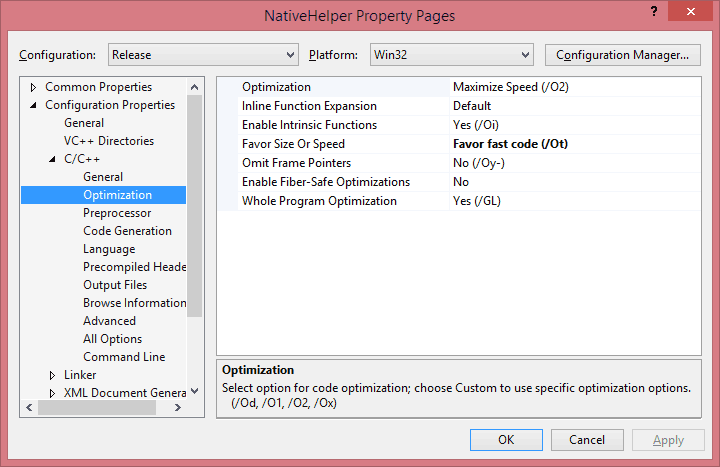
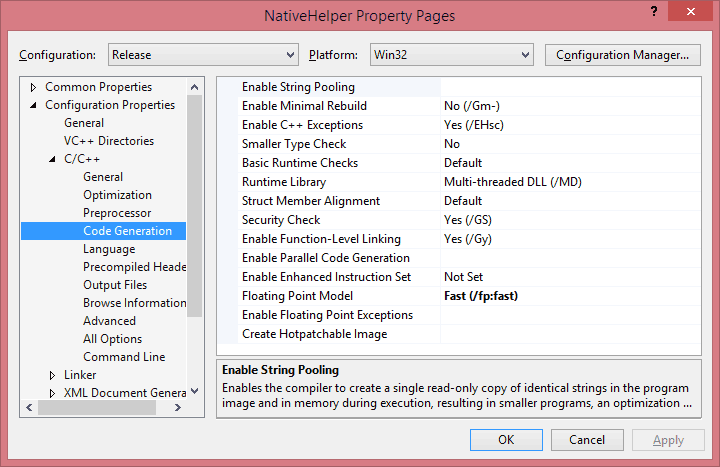
Finally, I found that accessing directly the Data pointer of the arrays was a bit faster than accessing them through the [] operator.

void NativeHelper::SkinnedModel::Skin(const Array<Matrix3x4Data>^ bones, Platform::WriteOnlyArray<VertexPositionNormalTextureData>^ vertices)
{  
    // copy data locally
    int bonesLength = bones->Length;
    Matrix3x4Data* locbones = bones->Data;
     
    VertexPositionNormalTextureData* vout = vertices->Data;
 
    // skin all of the vertices
    int icount = _verticesLength;
    for (int i = 0; i < icount; i++)
    {  
        int b0 = _skinVertices[i].BlendIndices.X;
        int b1 = _skinVertices[i].BlendIndices.Y;
        int b2 = _skinVertices[i].BlendIndices.Z;
        int b3 = _skinVertices[i].BlendIndices.W;
 
        Matrix3x4Data* m1 = &locbones[b0];
        Matrix3x4Data* m2 = &locbones[b1];
        Matrix3x4Data* m3 = &locbones[b2];
        Matrix3x4Data* m4 = &locbones[b3];
 
        float w1 = _skinVertices[i].BlendWeights.X;
        float w2 = _skinVertices[i].BlendWeights.Y;
        float w3 = _skinVertices[i].BlendWeights.Z;
        float w4 = _skinVertices[i].BlendWeights.W;
         
        Matrix3x4Data skinnedTransformSum;
        skinnedTransformSum.M11 = (m1->M11 * w1) + (m2->M11 * w2) + (m3->M11 * w3) + (m4->M11 * w4);
        skinnedTransformSum.M12 = (m1->M12 * w1) + (m2->M12 * w2) + (m3->M12 * w3) + (m4->M12 * w4);
        skinnedTransformSum.M13 = (m1->M13 * w1) + (m2->M13 * w2) + (m3->M13 * w3) + (m4->M13 * w4);
        skinnedTransformSum.M21 = (m1->M21 * w1) + (m2->M21 * w2) + (m3->M21 * w3) + (m4->M21 * w4);
        skinnedTransformSum.M22 = (m1->M22 * w1) + (m2->M22 * w2) + (m3->M22 * w3) + (m4->M22 * w4);
        skinnedTransformSum.M23 = (m1->M23 * w1) + (m2->M23 * w2) + (m3->M23 * w3) + (m4->M23 * w4);
        skinnedTransformSum.M31 = (m1->M31 * w1) + (m2->M31 * w2) + (m3->M31 * w3) + (m4->M31 * w4);
        skinnedTransformSum.M32 = (m1->M32 * w1) + (m2->M32 * w2) + (m3->M32 * w3) + (m4->M32 * w4);
        skinnedTransformSum.M33 = (m1->M33 * w1) + (m2->M33 * w2) + (m3->M33 * w3) + (m4->M33 * w4);
        skinnedTransformSum.M41 = (m1->M41 * w1) + (m2->M41 * w2) + (m3->M41 * w3) + (m4->M41 * w4);
        skinnedTransformSum.M42 = (m1->M42 * w1) + (m2->M42 * w2) + (m3->M42 * w3) + (m4->M42 * w4);
        skinnedTransformSum.M43 = (m1->M43 * w1) + (m2->M43 * w2) + (m3->M43 * w3) + (m4->M43 * w4);
         
        // Support the 4 Bone Influences - Position then Normal
        Vector3Data position = _skinVertices[i].Position;
        vout[i].Position.X = position.X * skinnedTransformSum.M11 + position.Y * skinnedTransformSum.M21 + position.Z * skinnedTransformSum.M31 + skinnedTransformSum.M41;
        vout[i].Position.Y = position.X * skinnedTransformSum.M12 + position.Y * skinnedTransformSum.M22 + position.Z * skinnedTransformSum.M32 + skinnedTransformSum.M42;
        vout[i].Position.Z = position.X * skinnedTransformSum.M13 + position.Y * skinnedTransformSum.M23 + position.Z * skinnedTransformSum.M33 + skinnedTransformSum.M43;
        Vector3Data normal = _skinVertices[i].Normal;
        vout[i].Normal.X = normal.X * skinnedTransformSum.M11 + normal.Y * skinnedTransformSum.M21 + normal.Z * skinnedTransformSum.M31;
        vout[i].Normal.Y = normal.X * skinnedTransformSum.M12 + normal.Y * skinnedTransformSum.M22 + normal.Z * skinnedTransformSum.M32;
        vout[i].Normal.Z = normal.X * skinnedTransformSum.M13 + normal.Y * skinnedTransformSum.M23 + normal.Z * skinnedTransformSum.M33;
 
        vout[i].TextureCoordinate = _skinVertices[i].TextureCoordinate;
    }
     
    return;
}


Overall, here are the results: 

Device Original Native Native(Parallelization)
L 620 11,769ms 5,875ms 4,475ms


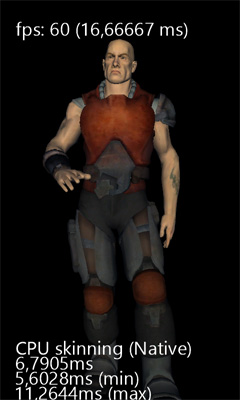
From 11,77ms it goes down to 5.87ms just by moving the code to C++, including the extra copy, cost of crossing the ABI from managed to native, etc. That is down to 50% of the original code = Twice as fast!


Auto-Parallelization

Another cool feature of VC+ compiler+ is Auto-Parallelization and Auto-VectorizationVectorization uses SIMD instructions when possible. It works only with basic value types like floats. It didn't like structs or pointers, but to be fair I didn't spend much time on it, nor did I try it on VS2015. All those are tests I done more than a year ago on VS2013.
Parallelization on the other hand was relatively easy to achieve. Parallelization uses multiple cores to run a loop in parallel. In the case of Lumia 620, it uses 2 cores/threads. By using native code and enabling Parallelization the time drop down to 4,47ms. Unfortunately it's very unstable, every few seconds it can spikes up to 300ms which makes it unsuitable for games.


Code

 CPUSkinning - 03 - GoNative.zip (7.17 mb)